GST billing · Stock · Accounts, in one app
Bill in seconds. GST done right. Books that balance themselves.
One click turns your quotation into a GST invoice, moves the stock and posts the books. Made for Indian dealers, distributors, shops and service firms.
No card needed for the trial. Your data stays in its own separate database.
TAX INVOICE
INV/26-27/0018
Sample
Billed to Shree Electricals Pune, Maharashtra · 27AAACS…
Place of supply 27 – Maharashtra CGST + SGST
Item Qty Rate Amount
Lighting LED panel 18W HSN 9405 20 450.00 9,000.00 Switchgear MCB 32A HSN 8536 30 220.00 6,600.00 Services Installation SAC 9987 1 1,500.00 1,500.00
Taxable value ₹17,100.00
CGST 9% ₹1,539.00
SGST 9% ₹1,539.00
Total ₹20,178.00
Watch: your first GST invoice in 4 minutes
Recorded in the real app. No editing tricks.
Your browser cannot play this video. Download it .
0:03 Welcome0:11 Set up your company0:18 Choose your business type0:34 Company details0:45 GST registration0:54 Your company is ready1:05 Your items1:18 Add a customer1:40 Create the invoice1:51 Group your items2:07 GST worked out for you2:17 Save the draft2:23 Opening stock2:52 Check and issue3:04 Your first invoice3:16 Send it3:23 Record the payment3:41 Your overview3:49 Next steps
From quote to cash, without typing anything twice
Quote in groups Lighting, switchgear and services as separate sections, with GST worked out per line. Turn it into an invoice Accepted quote → sales order → tax invoice, numbered per GST registration and financial year. Stock and books follow Stock goes out at moving average cost; sales, GST and receivables post to the ledger. Collect and see the day Record UPI or bank payments, send statements, and see what is owed on the overview.
Real screens from the real app
Real screens from ERPUltra, shown with sample data.
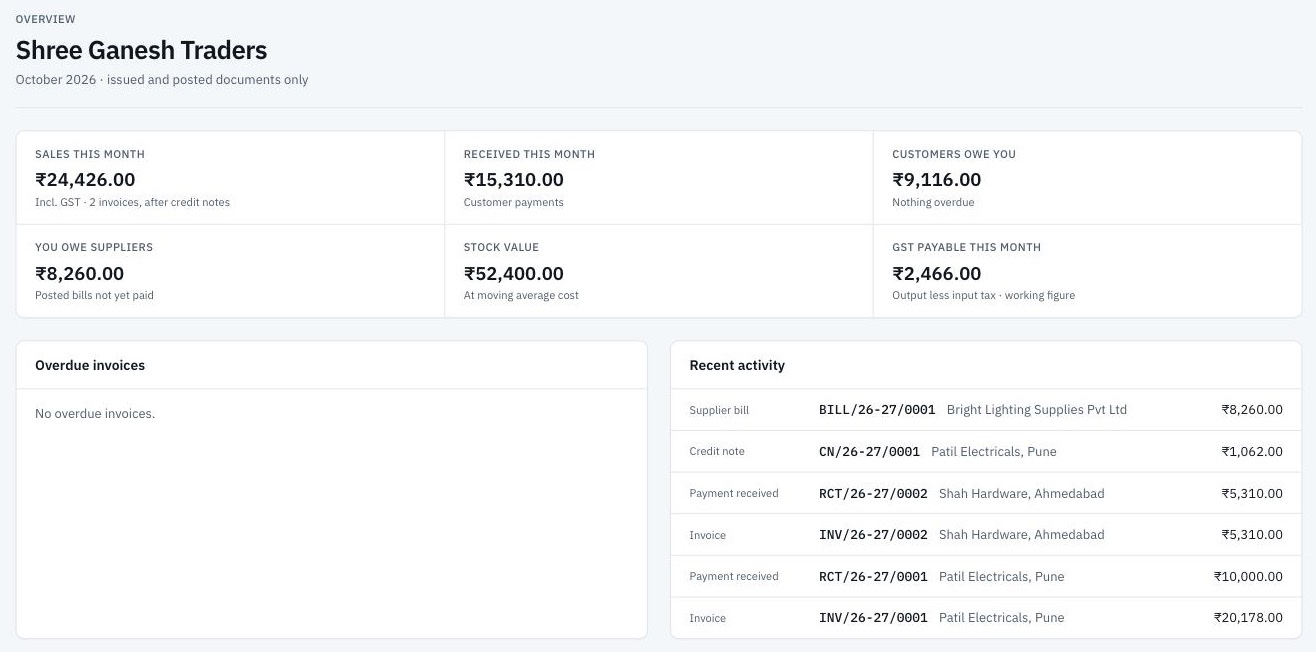
Your month at a glance Sales, collections, dues, stock value and GST payable, worked out from posted documents.
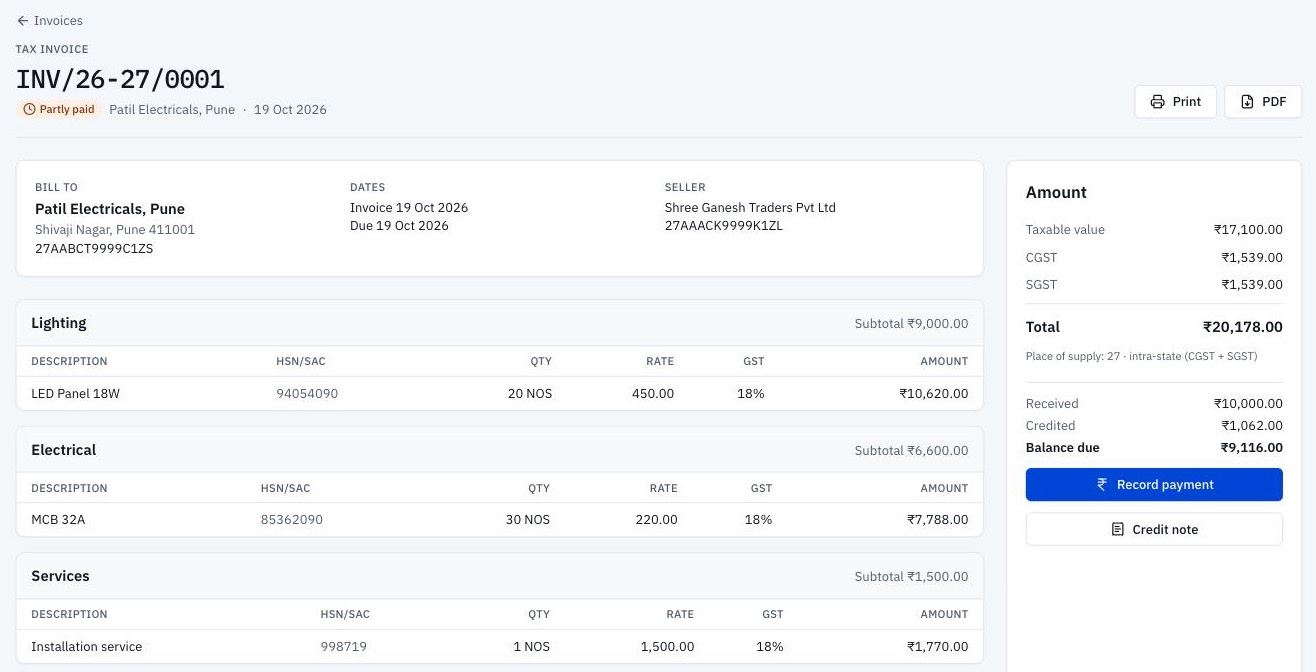
Invoices grouped the way you quote HSN per line, CGST + SGST or IGST from the place of supply, and the balance after payments and credit notes.
Ready for your trade on day one
Pick your business type and get the right fields, terms, stock rules and sample items with HSN codes, set up for you.
CGST + SGST or IGST from the place of supply, HSN/SAC on every line, credit notes that reverse tax correctly.
Each legal company keeps its own books, numbering and GST registrations. Roles decide who sees what.
Warehouses, transfers, stock counts and moving average valuation. Negative stock is blocked by default.
Purchase orders, goods receipts, supplier bills with input tax, and payments to suppliers.
Trial balance, P&L, balance sheet and ageing, plus GSTR-1 JSON and Excel, a GSTR-3B summary and a Tally export for your CA.
Today's sales and dues, and draft invoices and receipts that wait offline and sync once. Available to pilot customers first.
GST worked out on every line, automatically
CGST + SGST or IGST chosen from the place of supply
HSN/SAC and GST rate on every item, with effective dates
Invoice numbering per GST registration and financial year
Credit notes that reverse tax and stock correctly
GST summary of output and input tax for your accountant
E-way bill JSON for the portal is ready from any goods invoice. E-invoicing (IRN) is coming next as an optional add-on. GST calculator · HSN code finder
Your books, locked down
Every business gets its own separate database
Daily backups, restore-tested automatically
Two-factor sign-in and roles for each team member
A full audit log of who changed what
Our staff can look in only after you grant time-limited access
How we protect your data →
From sign-up to first invoice in minutes
Create your workspace Sign up with your email; no card needed. Add your company and GSTIN Numbering and your books are set up for you. Bring in customers and items Type them in or import a spreadsheet; add opening stock. Issue your first invoice Then record the payment when it arrives.
Step-by-step guides · Video walk-throughs
Questions
Is the trial really free? Yes. The 14-day trial needs no card and nothing is charged. Choose a plan in Settings → Billing whenever you are ready.
Does it work for more than one company or GSTIN? Yes. One workspace can hold several companies, each with its own books, numbering and GST registrations. Plans differ in how many you can add.
Can my accountant use it? Yes. Invite them with a role that fits; they get the trial balance, P&L, balance sheet, ledgers, registers and the GST summary, and can export to CSV.
Can I bring my existing customers and items? Yes, by importing a spreadsheet. Opening balances and opening stock can be entered too.
What happens to my data if I stop paying? Nothing is deleted. After a grace period the workspace becomes read-only until you renew.
Is there a mobile app? A mobile app for daily sales, drafts and payments is in pilot with early customers. The web app works on phones and tablets today.
Plans from ₹499 a month
Pay monthly, or yearly and get two months free. Prices exclude 18% GST.
See plans and limits